

This article will outline 3 simple steps you can take to improve your SEO. It’s particularly relevant for new websites, but even existing sites can benefit from these 3 tips.
Updated October 2026: We’ve refreshed this guide to reflect changes in search, including AI-powered search results, while keeping the focus on the simple SEO basics that still matter.
What is SEO?
SEO is search engine optimisation. That is: making your website as useful and understandable as possible for both your visitors and search engines, so that it has the best chance of appearing in relevant search results. SEO work never really stops – there are always things which can be improved as your business, your website and the way people search change.
Hang on – haven’t you already optimised my website for me?
Yes! But that’s only part of the story.
When we build your website we’ll look at what you want to rank for and agree some keywords and phrases that should be woven naturally into your content. What you write is incredibly important. We’ll make sure the pages are structured properly, that headings and images are used well, and that search engines can understand what each page is about. This is what we call on-page SEO. We also build sites with speed, accessibility and usability in mind.
It’s a lot of work, but it’s only the beginning …
So why do I not appear in searches?
A brand-new website normally needs time to establish itself. Google needs to discover your pages, understand what your business does and work out which searches your site is useful for. It can also help when information about your business appears consistently elsewhere online and when other reputable websites link to you. So rather than looking for a magic SEO switch, there are a few simple things you can start doing.
3 Steps to Improve your SEO
Step 1 – Build out Your Business Profile Online
The single best thing you can do to kick start your SEO strategy is to create an online business profile and start getting reviews. Here’s how:
Create a Google Business Profile
Sign up for a Google Business Profile – this is an absolute must do, particularly for businesses serving a local area. You can find out how to set your business up here: https://support.google.com/business/answer/10514137?hl=en-GB
Make sure your details are accurate, add your services or products where appropriate, include photographs and link back to your website.
Get Customer Reviews
Next up, ask your customers for reviews.
Genuine reviews help potential customers decide whether to use you and can also strengthen your presence in local search results. Don’t worry about trying to tell customers what to write – just ask them to leave an honest review.
Create a Bing Places Profile
Google isn’t the only search engine. Bing Places is free and gives you another opportunity to make sure your business details are correct and easy to find. You can create your Bing listing here: https://www.bingplaces.com/
Claim your free Yell.com listing
Yell is still one of the better-known UK business directories, and a free listing can help make your business easier to find online. You can create your free listing with Yell here: https://www.yell.com/free-listing/.
Make sure your business name, address, phone number and website details are accurate and consistent with the information on your website and Google Business Profile. Add a useful description of what you do, but write it for potential customers rather than trying to cram it with keywords.
You can also use Yell’s ConnectScan to see where your business is already listed online. Once you’ve run the scan, you’ll usually get ideas for other free business listings too, such as Cylex.
Take your time and work through the useful ones. The aim is to get your business listed consistently across reputable local and business directories, with the same name, address, phone number and website details wherever possible.
Step 2 – Build Your Backlinks
Quite simply, these are links from other websites back to yours. A useful link from another genuine, relevant website can help people discover your business and can also help search engines understand your website and its place on the web.
But there are a couple of caveats:
- Quality and relevance matter more than quantity. Ten useful links from real businesses, organisations or websites connected with what you do are far more valuable than hundreds of links from sites nobody has ever heard of.
- Building good links takes time. This is not going to be an instant win.
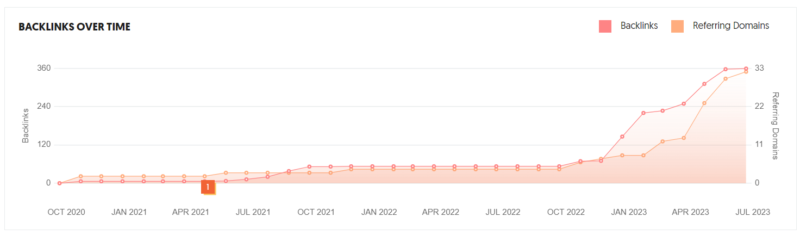
As you can see from the image above, building backlinks (in this case to our site) takes time. But it will pay off.
How can I build backlinks?
Great question! And there’s more than one way. The first thing we often do is look at your business and the organisations you already have a genuine relationship with. Perhaps you belong to a trade association, work with suppliers, support a local organisation or are listed by a tourism body. These can all provide sensible opportunities. We can also look at where your competitors are getting useful links from, which may give us some ideas.
If you run a holiday let, for instance, then a local tourism or accommodation site such as Visit Eden might be relevant. For another business, there may be an industry website, local organisation or specialist blog that makes more sense.
Don’t build links simply for the sake of having links. Ask whether the website and the link would make sense to a real person.
Step 3 – Write Useful Specialist Content
Another good way to improve your visibility is to write useful content about the things your customers actually want to know. Think about the questions people ask you before they buy from you, for example. Could one of those questions become a useful page, article or guide?
For your business that might mean answering a common technical question, explaining how something works, comparing different options or sharing genuinely useful advice from your own experience. This page is an example: it answers a question we regularly discuss with clients who have launched a new website.
Good content can help you appear for a wider range of searches, gives people a reason to visit your site and may even attract links from other websites.
And search isn’t only about the traditional list of Google results anymore. Useful, clear content also gives modern search and AI tools a much better chance of understanding what your business does and when your website may be helpful.
The important thing is not to write articles simply because somebody told you that “Google likes blogs”. Write something because it will genuinely help the sort of person you want to visit your website.
Let’s recap on those 3 Simple Steps to improve your SEO
Firstly, make sure your business is properly represented online and start collecting genuine customer reviews. Secondly, look for useful and relevant links back to your website. Thirdly, keep improving your website with genuinely helpful content based on the questions your customers actually ask.
None of these is a quick trick to propel you to #1 on the search listings. But together they help build a stronger website and give search engines a much clearer picture of your business.
I can’t do this on my own. Can you help with my SEO?
Yes we can! We offer practical SEO support ranging from one-off audits and keyword research through to ongoing SEO work and reporting.
The first thing we normally do is sit down with you and work out what you actually want to achieve. We don’t need to boil the ocean and change everything at once. We can focus on the areas with the best opportunities, make sensible improvements and then measure what happens.
If you’re interested in SEO support, please get in touch today.